Private AI notes
for iPhone
Capture the thought before it disappears. FlowForge turns your voice into a polished note, and when the conversation is bigger, a clear meeting record.
Free download. FlowForge Pro unlock is a one-time $39.99. No subscription.
FlowForge is an iPhone app that turns a spoken thought into a clean, polished note. It transcribes your voice on device with Whisper, refines it with Apple Intelligence, and saves it to Obsidian, a Files folder, Apple Notes, Notion, Google Drive, Todoist, or your calendar. It is free to download, with a one-time $39.99 Pro unlock and no subscription.
A quick note, or a whole meeting
Catch the thought. Speak a reminder, idea, or follow-up while it is still fresh, and get a clean note back.
Leave with the record. Turn a full conversation into a speaker-labelled transcript, summary, and action items.
From a spoken thought to a saved note
Speak a quick note
Tap the mic and talk. Start from the Action Button, Siri, the Lock Screen and home-screen widgets, or a shared bit of text. Transcription runs locally with Whisper, so your audio never leaves the phone.
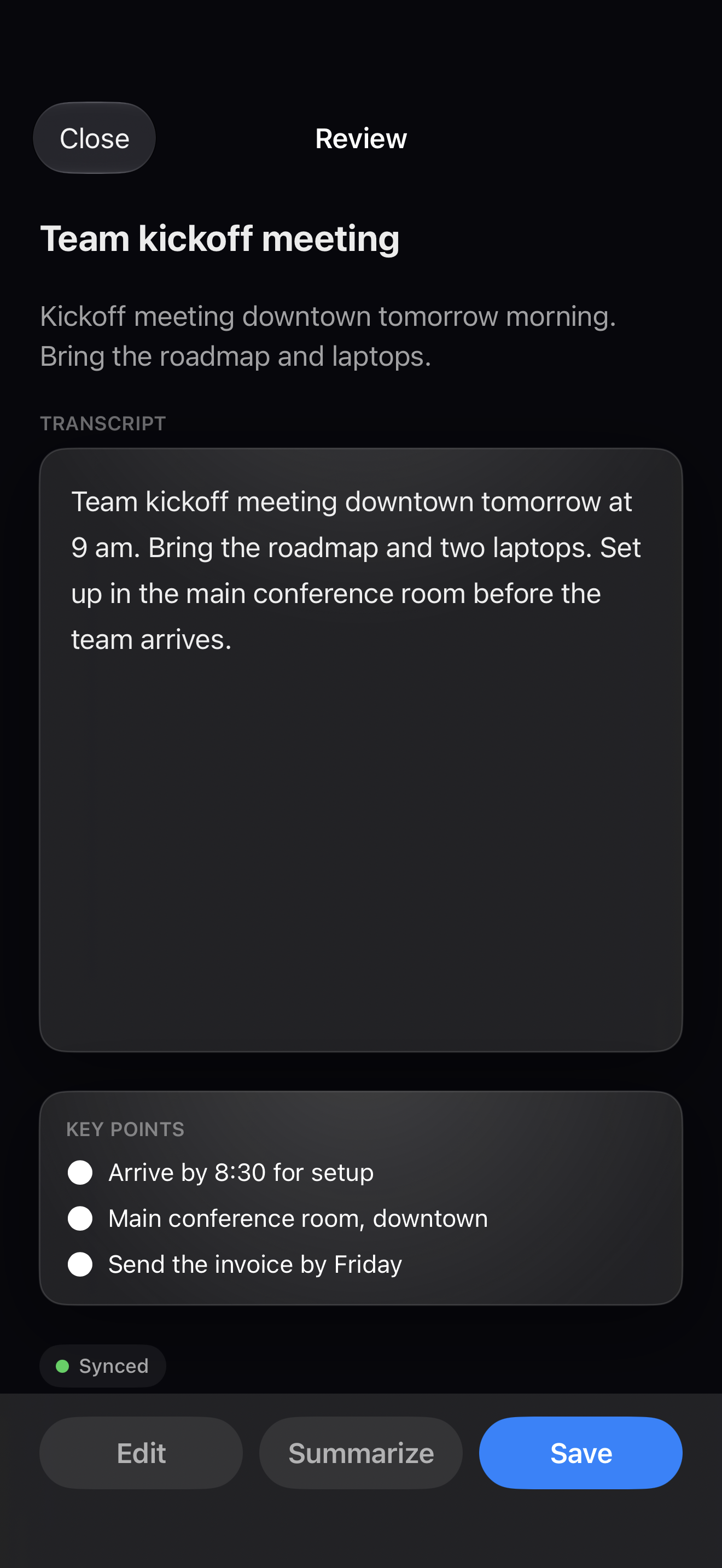
Polished on device
Apple Intelligence cleans up rough dictation and summarizes longer notes, entirely on device. No account and no cloud round-trip.
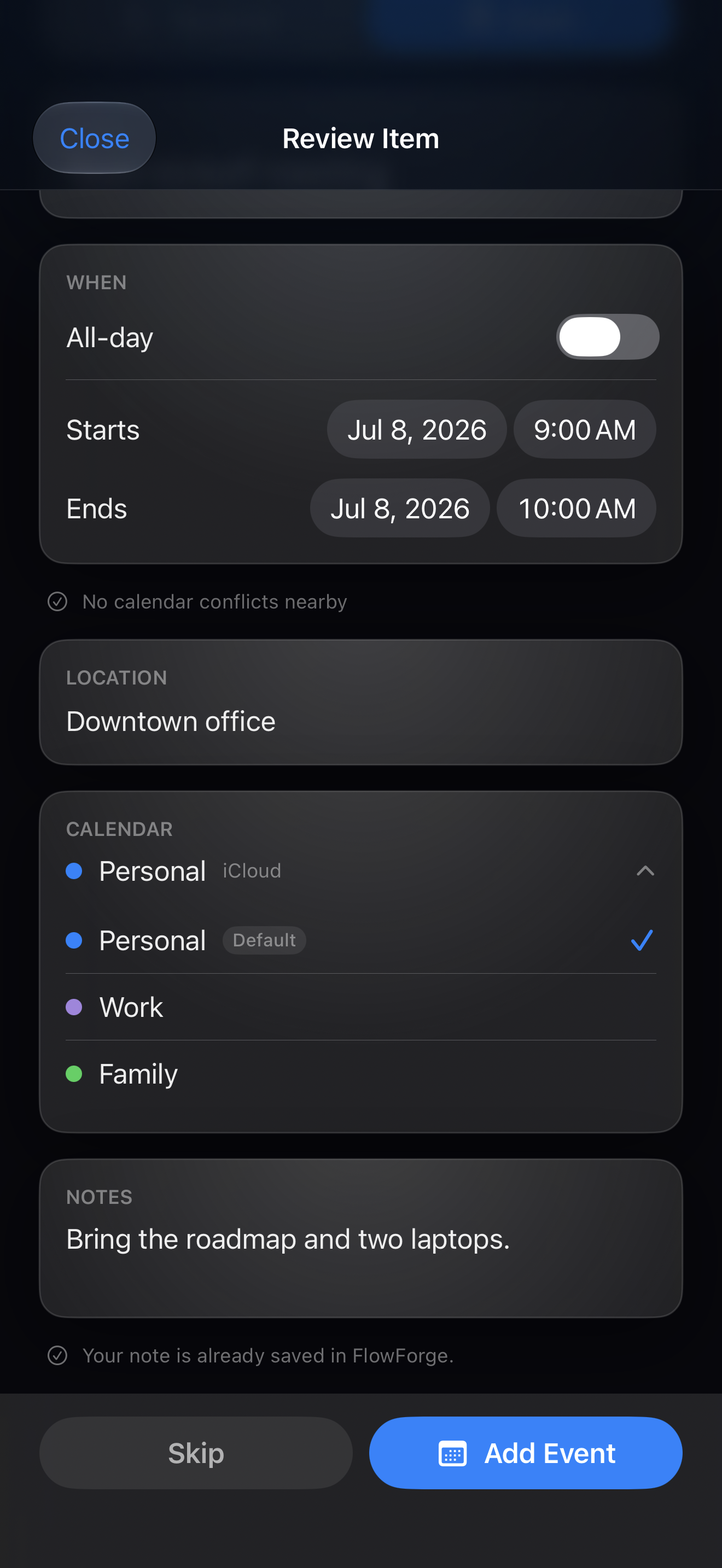
Plans become calendar items
Mention a meeting or a reminder and FlowForge detects it. You review every event in an editable preview before anything is written to Apple Calendar, Reminders, or Todoist.
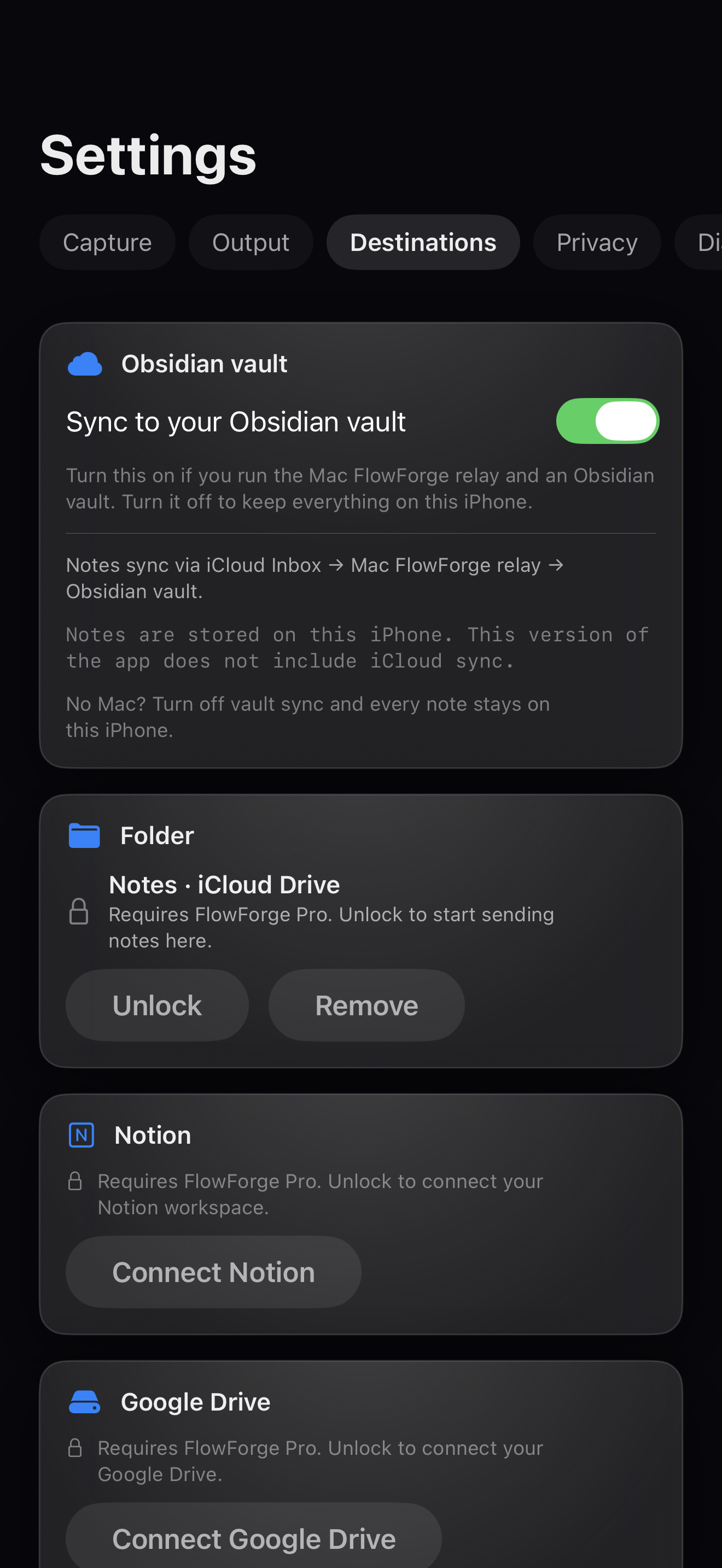
Saved where you work
Route notes to a Files folder as markdown, Apple Notes, Todoist, or straight into your Obsidian vault through the Mac relay. No Mac? Everything still lives in FlowForge.
Always in your history
Every note is kept locally in FlowForge, protected behind Face ID if you want it. Re-open, re-send, or export any note at any time.
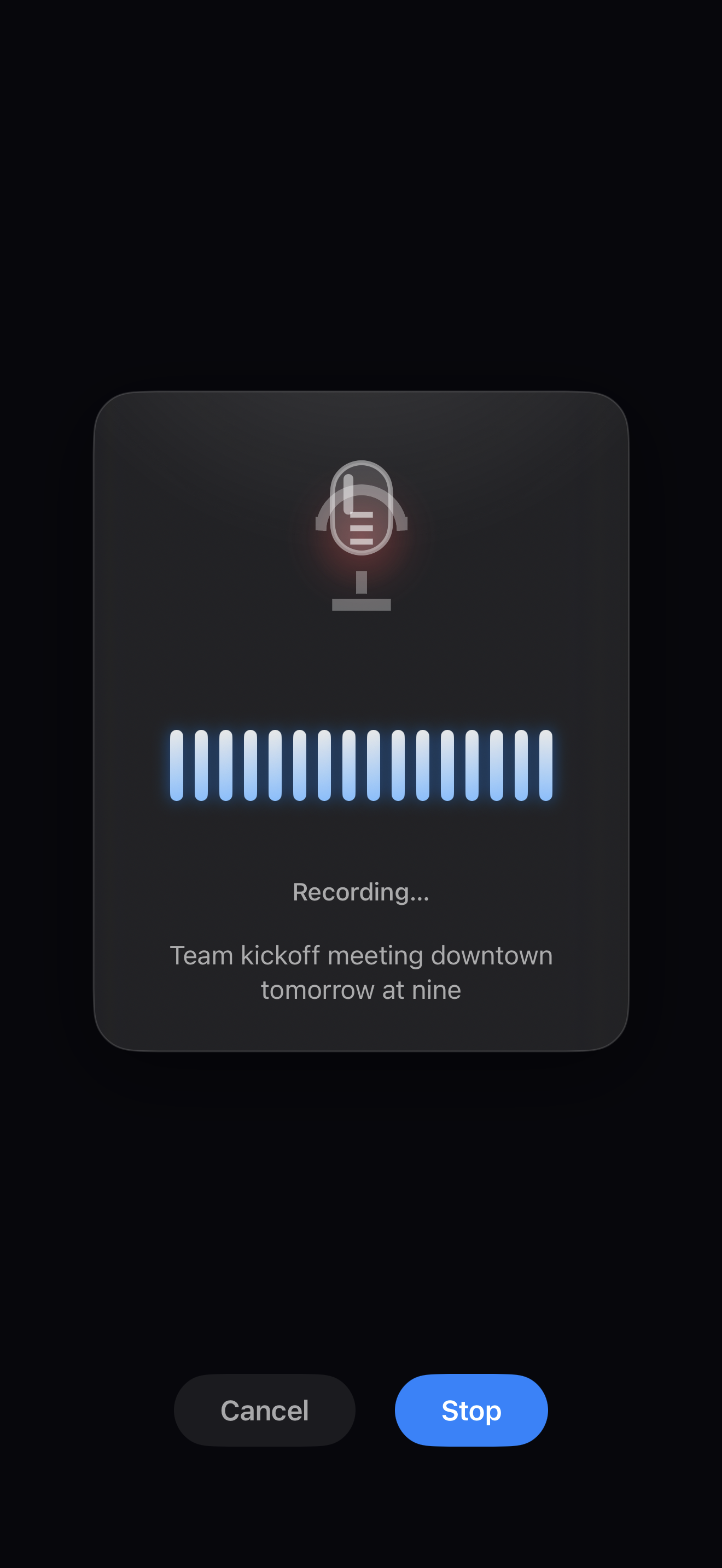
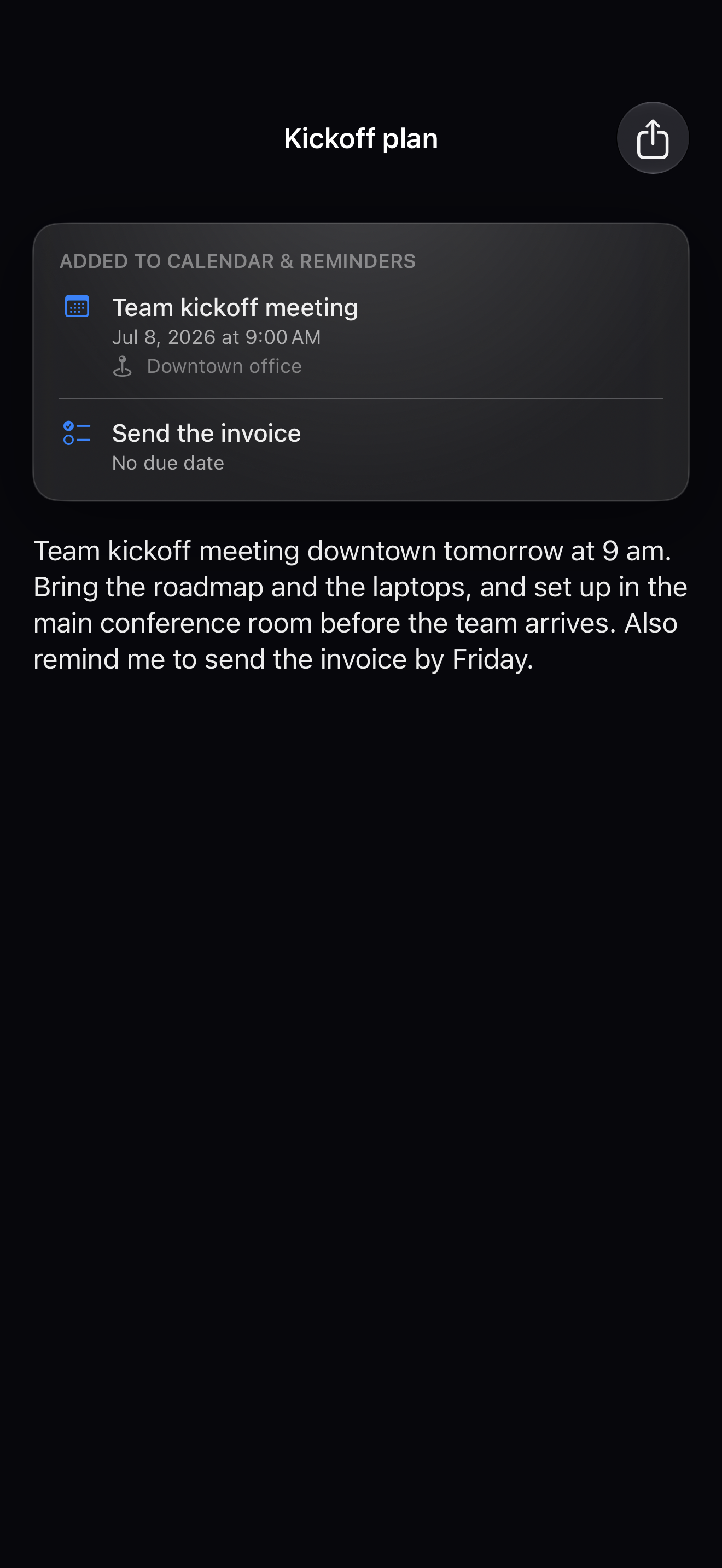
Speak a quick note
Tap the mic and talk. Start from the Action Button, Siri, the Lock Screen and home-screen widgets, or a shared bit of text. Transcription runs locally with Whisper, so your audio never leaves the phone.
Polished on device
Apple Intelligence cleans up rough dictation and summarizes longer notes, entirely on device. No account and no cloud round-trip.
Plans become calendar items
Mention a meeting or a reminder and FlowForge detects it. You review every event in an editable preview before anything is written to Apple Calendar, Reminders, or Todoist.
Saved where you work
Route notes to a Files folder as markdown, Apple Notes, Todoist, or straight into your Obsidian vault through the Mac relay. No Mac? Everything still lives in FlowForge.
Always in your history
Every note is kept locally in FlowForge, protected behind Face ID if you want it. Re-open, re-send, or export any note at any time.
Everything the core loop needs, on your phone
On-device transcription
Whisper turns speech into text right on your iPhone. Your audio never leaves the device for speech-to-text.
Apple Intelligence polish
Rough dictation is cleaned up and long notes are summarized, entirely on device. No account, no cloud round-trip.
Meeting Mode
Record a full conversation and get a speaker-labelled transcript, a summary, and action items, all built on device. Part of FlowForge Pro.
Plans to your calendar
Schedulable items are detected and shown in an editable preview before anything writes to Calendar, Reminders, or Todoist.
Routes to where you work
Files as markdown, Apple Notes, Todoist, Notion, Google Drive, or your Obsidian vault via the Mac relay.
Capture from anywhere
Action Button, Siri, the Lock Screen and home-screen widgets, and a system share extension for text from any app.
Private by default
Face ID can lock your history. No login, no subscription, no telemetry on your voice. It stays on your phone.
Works standalone
No Mac and no vault required. Everything runs on the iPhone and lives in FlowForge until you choose to send it somewhere.
Second-brain ready
Built for Obsidian and PKM workflows. Plaintext markdown that drops straight into the vault you already keep.
A meeting you can act on after it ends
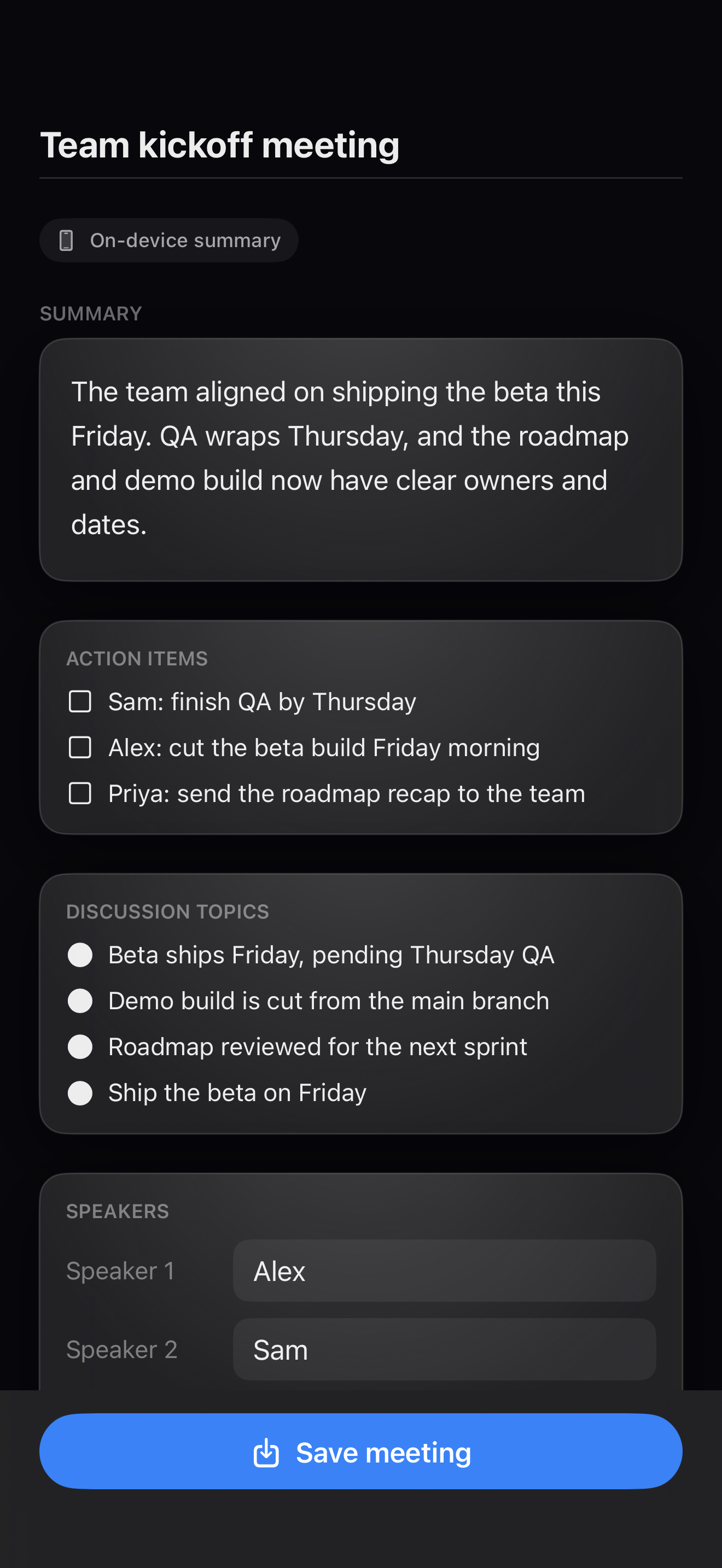
Record the conversation. FlowForge builds a speaker-labelled transcript, a clear summary, discussion topics, and action items, so the work does not end when everyone leaves the room.
Long-form recording
Built for real conversations, up to about 2.5 hours. Client calls, study groups, planning sessions.
On-device transcript & speakers
FlowForge transcribes on the iPhone and labels who said what. Recording and transcription stay on device.
Summary & action items
A clear summary, discussion topics, and action items you can edit before saving.
Export where you work
Send the record through the same FlowForge destinations as your quick notes.
Set up only what you need
Onboarding is three steps: choose a home for your notes, allow the microphone, and start capturing. Connect any destination later, in Settings, when it is useful to you.
Open FlowForge and choose a starting point
Keep notes on iPhone, sync with Obsidian, or decide later. Onboarding records the preference. Nothing is forced.
Allow the microphone
The only required permission for voice capture. Decline anything else and your notes still save.
Start capturing
Tap the mic, Action Button, or Siri. Add Apple Intelligence, Calendar, and destinations when they are useful to you.
Set up a destination later
- Obsidian syncs through the Mac relay; standalone mode works with no Mac.
- A Files folder, automatic calendar and reminder writes, Todoist, Notion, and Google Drive are FlowForge Pro, connected in Settings.
- Apple Notes uses the supplied Shortcut.
The whole core loop is free
Capture, transcription, on-device polish, history, Apple Notes, and Obsidian sync cost nothing. Pro adds automatic export, calendar writes, Notion, and Meeting Mode in a single one-time unlock.
- Voice + text capture from anywhere
- On-device Whisper transcription
- Apple Intelligence polish and summarize on device
- Notes kept in FlowForge history, Face ID lock
- Apple Notes export & Obsidian vault sync
- Manual send to apps and email-to-self
- Schedule detection with editable preview
- Automatic markdown export to a Files folder you choose
- Calendar events & reminders from voice notes
- Route to Apple Calendar, Reminders, or Todoist
- Send notes to Notion or Google Drive
- Meeting Mode: record, transcribe, summarize & pull action items
- One-time purchase, no subscription
- Your voice stays on the device
Your note is already saved in FlowForge. Pro adds automatic export on top.
FlowForge vs Wispr Flow
See the full comparison →| FlowForge | Wispr Flow | |
|---|---|---|
| Price | $39.99 one-time | $15/mo, or $12/mo billed annually ($144/yr) |
| Billing | One-time purchase, no subscription | Subscription |
| Speech-to-text | On device (Whisper) | Cloud-based (privacy mode available) |
| Account | None required | Account required |
| Platforms | iPhone (iOS 26+) | Mac, Windows, iPhone, Android |
| How you use it | Capture into FlowForge, then route out | Type by voice system-wide in any app |
FlowForge is $39.99 once. Wispr Flow Pro is $15/mo, or $12/mo billed annually ($144/yr, about $432 over three years). Verified July 2026.
Be first when it launches.
Free to download. Unlock FlowForge Pro one time for automatic destinations, calendar export, and Meeting Mode. No subscription, no account, and your voice never leaves your phone.
iPhone, iOS 26+. FlowForge Pro is a one-time $39.99 in-app purchase (US; local pricing in the App Store).
Questions, answered
Is FlowForge free?
Yes. FlowForge is free to download, and the whole core loop is free: voice capture, on-device transcription, Apple Intelligence polish, note history, Apple Notes export, and Obsidian vault sync. A one-time $39.99 Pro unlock adds automatic export to a Files folder and calendar writes. No subscription.
Does FlowForge work offline and on device?
Yes. Speech-to-text runs locally with Whisper and Apple Intelligence polishes notes on the iPhone itself. Your audio never leaves the device for transcription, no account or login is required, and capture works with no connection.
Do I need a subscription?
No. FlowForge Pro is a one-time $39.99 unlock, not a subscription. You download the app free and pay once if you want automatic destinations and calendar export. There is no recurring bill and no account to manage.
Does FlowForge work with Obsidian?
Yes. Notes land in an iCloud inbox and the FlowForge Mac relay files them into your Obsidian vault as plaintext markdown. Vault sync is free. You can also route notes to a Files folder, Apple Notes, or Todoist.
What iPhone and iOS version does FlowForge need?
FlowForge runs on iPhone with iOS 26 or later and is optimized for the latest models. On-device polish uses Apple Intelligence; on older hardware you can add your own optional key for cloud polish, which is off by default.
Is my voice data private?
Yes. Transcription runs on device, notes are stored locally and can be locked with Face ID, and no account is required. FlowForge never sends your voice to the cloud for speech-to-text. Read the privacy policy for details.
Does Meeting Mode send my recording to the cloud?
No. Meeting Mode records, transcribes, and labels speakers on your iPhone. A cloud summary is optional, off by default, and uses your own AI key only when you turn it on, and FlowForge tells you when a summary used it. Meeting Mode is part of FlowForge Pro.
How is FlowForge different from Wispr Flow?
FlowForge is local-first and a one-time $39.99 purchase, versus Wispr Flow's roughly $144 per year subscription with cloud processing. FlowForge keeps your voice on device and routes notes to Obsidian, Files, Apple Notes, Todoist, or your calendar.
Your voice stays on device. Transcription runs locally, there is no account or login, and speech is never sent to the cloud. Read the privacy policy.